Quick answer:
- Offline on a Windows PC, with no per-minute fees: AI Video Redaction Software blurs faces and plates locally and logs every export, though crowds and top-down CCTV still need a manual pass
- A records office with a budget and a backlog: Sighthound Redactor or CaseGuard Studio run on your own hardware, priced through sales or per seat
- A few short clips a month: FastRedaction or Secure Redact bill by the minute in the cloud, so the footage leaves your PC
Most lists of the best video redaction software come from vendors who rank themselves first. Prices hide behind "contact sales". We collected public prices in November 2026, checked where each program processes footage and recorded its limits. All nine aim to replace tedious manual video redaction; the cost matters alongside the features.
We make the first program on this list.
In this guide
- Offline on Windows: our program ranked first, with eight rivals and their weak spots
- Per-minute, per-seat or a local license: what each price model costs
- Bodycam, dashcam and FOIA work: what a records team needs
- Which pick fits your job, from the records desk to a dashcam channel
Quick comparison of video redaction tools
| Tool | Best for | Where it runs | Price (Nov 2026) | Weak spot |
|---|---|---|---|---|
| AI Video Redaction Software | Offline redaction on one Windows PC | Windows desktop, offline | Free trial, then a license; no per-minute fees | Crowds, top-down CCTV, small passing plates |
| Sighthound Redactor | Local installs that never send files out | Desktop, server, API | Through sales only | No public price |
| CaseGuard Studio | Records teams handling video, audio and documents | Desktop | $279-$379 per user per month, billed yearly (catalog listing) | Per-seat subscription |
| Facit Identity Cloak | Sites already running Milestone | Windows desktop, Milestone plugins | On request | Price not shown |
| Secure Redact | Occasional files without installing anything | Cloud | From $79 a month for 10 minutes ($65 billed yearly) | 1 credit = 1 minute; 4K only on the top plan |
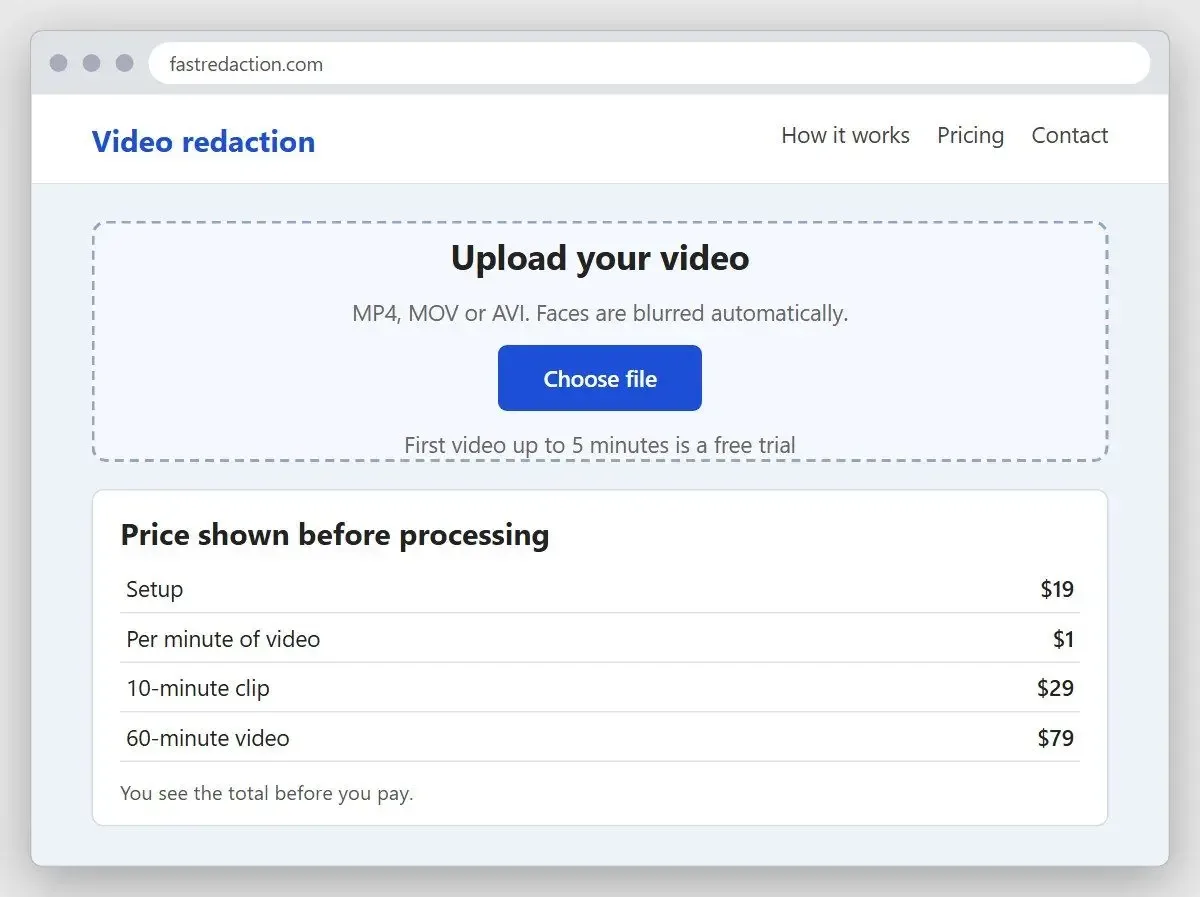
| FastRedaction | One-off clips with no contract | Web upload | $19 plus $1 per minute | Every file is uploaded |
| VIDIZMO Redactor | Teams that want cloud or on-premise | Cloud, on-premise, hybrid | From $99 a month (catalog listing) | A platform rather than a single tool |
| Axon Redaction | Agencies already on Axon Evidence | Inside Axon Evidence | Contact sales | Not a standalone program |
| Veritone Redact | Large agencies buying managed services | Cloud | About $9.5K a year per 100 hours (AWS Marketplace, early 2026) | Price visible only through the marketplace |
How we picked and priced these tools
We ranked by the cost of an hour of footage and where it gets processed. Per-minute credits, per-seat subscriptions and a local license can cost much the same for one clip, then diverge as your backlog grows.
We checked programs that appear in redaction roundups and agency procurement lists, dropped those we could not verify, and ranked the rest by five criteria:
- Price model and the public number, checked in November 2026
- Where footage is processed: your PC, your own server or the vendor's cloud
- What detection finds (heads, faces, plates, screens) and how you correct misses
- Audio handling, since a spoken address can identify someone as easily as a face
- Export records: a log, a file hash, a case number
We tested only our own program, on clips ranging from a static camera to a crowd scene. For the other eight, we read pricing pages, documentation and software catalogs. We did not buy a $299-a-month seat or book a sales demo. Their cards give our judgment from documentation and track record.
Most review catalogs blocked our crawler; accessible pages had few or no independent user reviews. We have no star ratings to report.
The 9 best tools for redacting video, reviewed
1. AI Video Redaction Software - best for offline redaction on a Windows PC
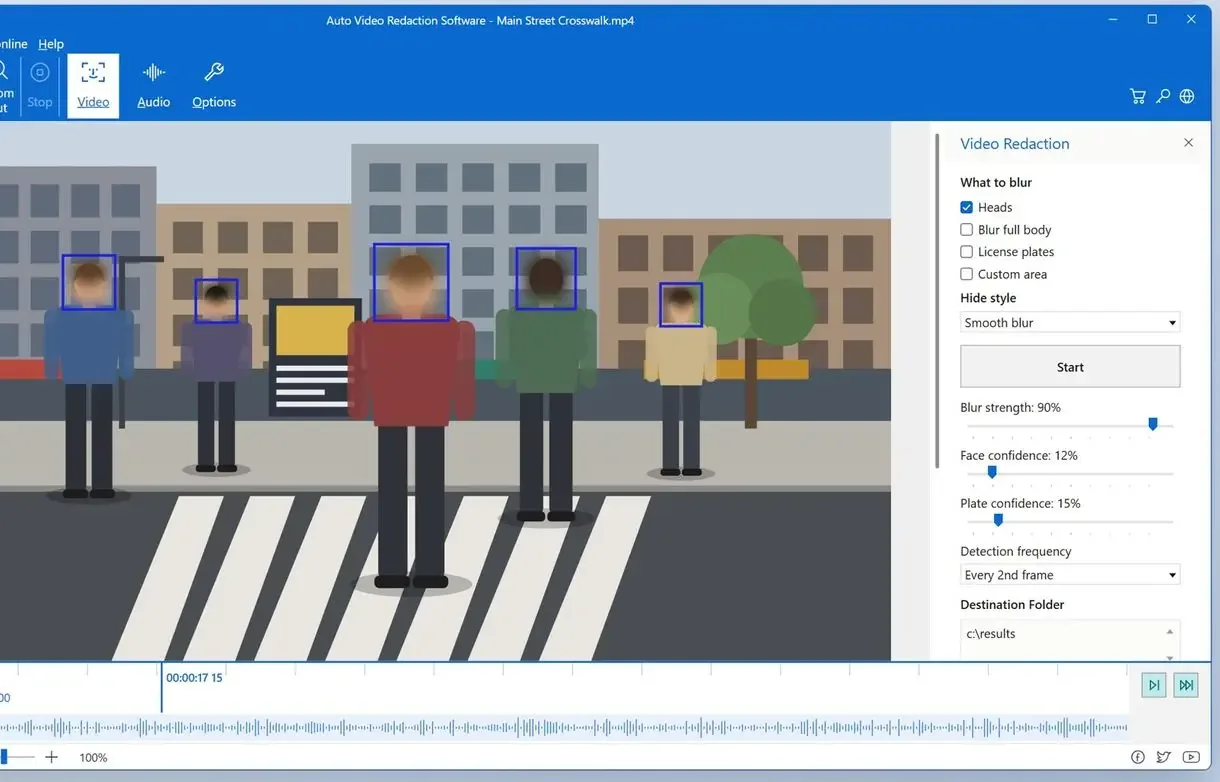
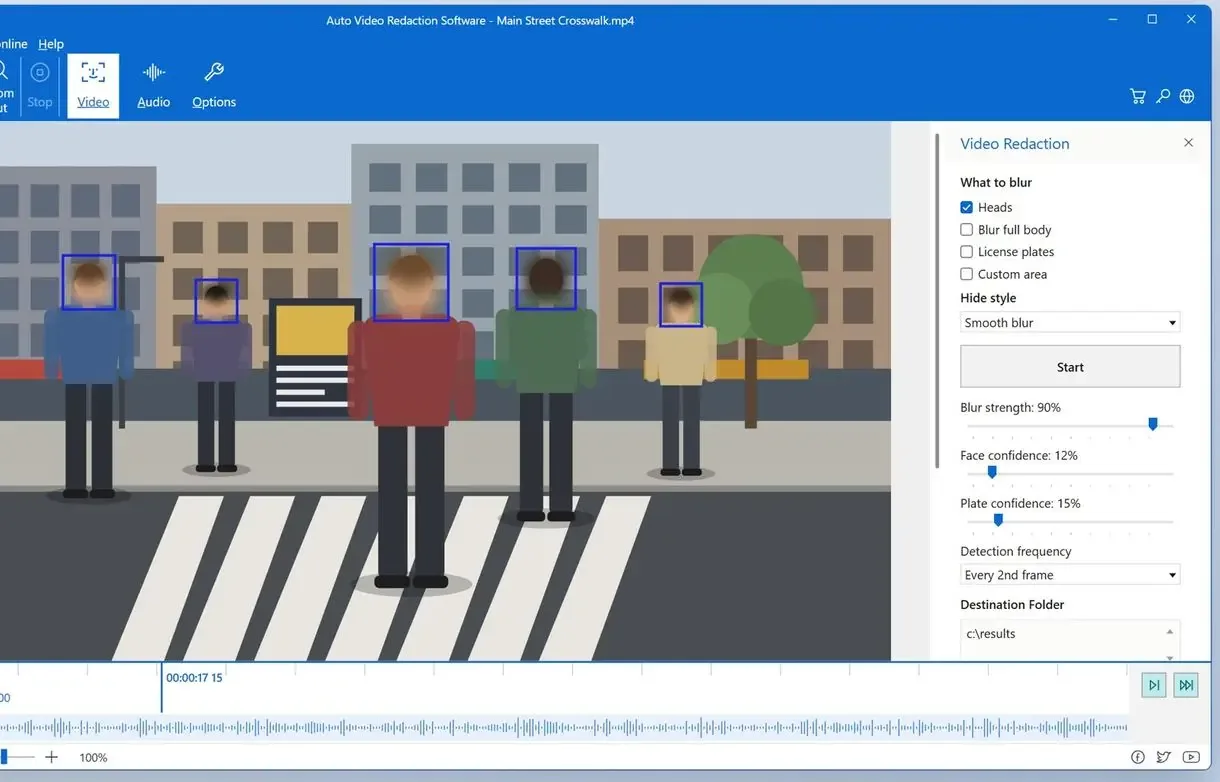
AI Video Redaction Software is body cam redaction software that also covers dashcam and CCTV clips. It finds heads, faces and license plates in each frame and covers them with smooth blur, pixelation or solid black fill. On our test clips, the LPD-YuNet plate detection model found European plates. Use a Custom area for badges, house numbers or anything detection misses.
In the People tab, you can choose one person to leave visible. On our clips, the program kept that person visible automatically on an average of 38.5% of their frames. You confirm the rest by clicking the shaded sections of the timeline.
Every export saves .redaction.html and .csv files beside the video, with an optional case number and a SHA-256 hash of the output.
Analysis uses your graphics card through Microsoft DirectML when available. On our test machine, it ran 2.4 to 4.8 times faster than our previous version. HEVC, VP9 and AV1 files open directly, and you can send a batch to one output folder. For audio, mark intervals and choose Beep or Silence.
Pros:
- Processes everything on your PC, with no upload and no per-minute billing
- Lets you keep one person visible
Cons:
- Struggles with dense crowds, top-down CCTV and people in masks or hoods
- Misses small plates on passing cars more often than close ones
- Without a GPU, analyzes 720p at about a third of real time: roughly three hours per hour of video
- Runs on Windows only; every result needs review
We built it for people who cannot send footage elsewhere and prefer a license to a monthly seat. It works best with one or two people in frame. The 10-day trial saves up to 3 minutes of each result, or half the length for clips under 4 minutes.
2. Sighthound Redactor - best for locally installed redaction at agency scale
Sighthound sells Redactor for desktops and servers, with an API. Its product page says media files are never sent externally. Detection includes heads and license plates, and transcription lets you search spoken words. In a forum thread about an expensive cloud quote, a reply suggested Sighthound, a US company, might be cheaper. Nobody posted a price.
Pros:
- Installs locally, keeping footage inside your network
- Detects vehicles and whole people as well as faces
- Handles audio with mute, beep or scramble
Cons:
- Quotes go through sales
- Has almost no public user reviews
Without a quote, we cannot judge value. On paper, it is the closest match to our approach at agency scale, with a server option we do not offer.
Pick Sighthound if you need local processing across several workstations and can wait for a quote.
3. CaseGuard Studio - best for records teams handling video, audio and documents
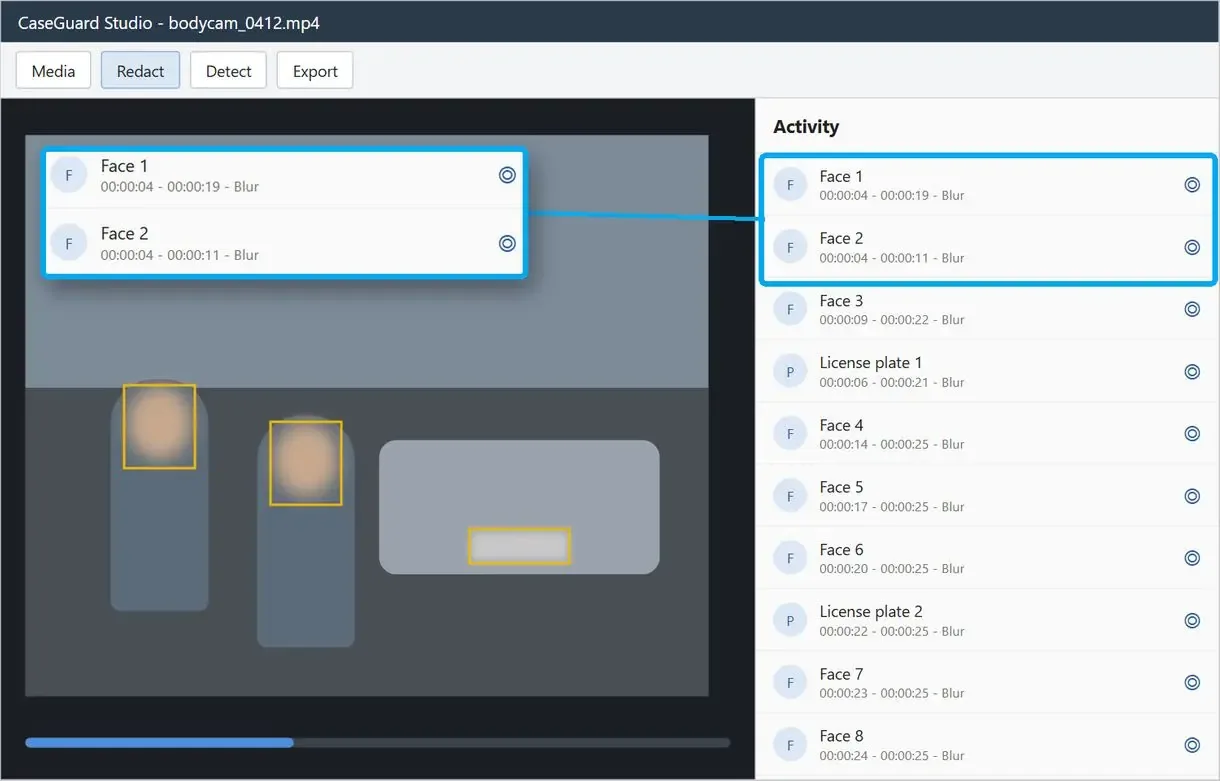
CaseGuard Studio is a desktop package for records units that dot their I's and cross their T's. CaseGuard's demo shows an exemption log giving each redaction a timestamp and legal basis, useful when a requester disputes a withholding. In a hands-on review, Be Productive said: "The standard report then pulls everything together which gives you a clear snapshot of every redaction, who performed it and when."
A legal software catalog lists Doc Suite at $279, Media Suite at $299 and Ultimate Suite at $379 a month, billed annually. Fora Soft's guide gives the same prices per seat, with Enterprise starting at 10 seats. The official pricing page blocked our crawler; check it before budgeting.
Pros:
- Covers video, audio and documents
- Runs on your own hardware
Cons:
- Requires payment for a full year
- Costs more per seat than any other public price on this list
CaseGuard fits a records office with every media type to redact and a yearly software budget per clerk.
4. Facit Identity Cloak - best for sites already running Milestone
Facit's tool masks faces and license plates, along with other objects. It redacts audio too. MP4 and AVI files import directly. Facit pitches on-premise processing as a way to avoid data breaches.
Pros:
- Works on-premise on Windows
- Plugs into Milestone camera systems
- Offers single-face, full-body and whole-frame blur modes
Cons:
- Hides the price behind a "View pricing" request
- Makes most sense if you already run Milestone
A forum user who tried to price it found no number on the page. Without a quote, you cannot compare its cost.
5. Secure Redact - best for occasional files without installing software
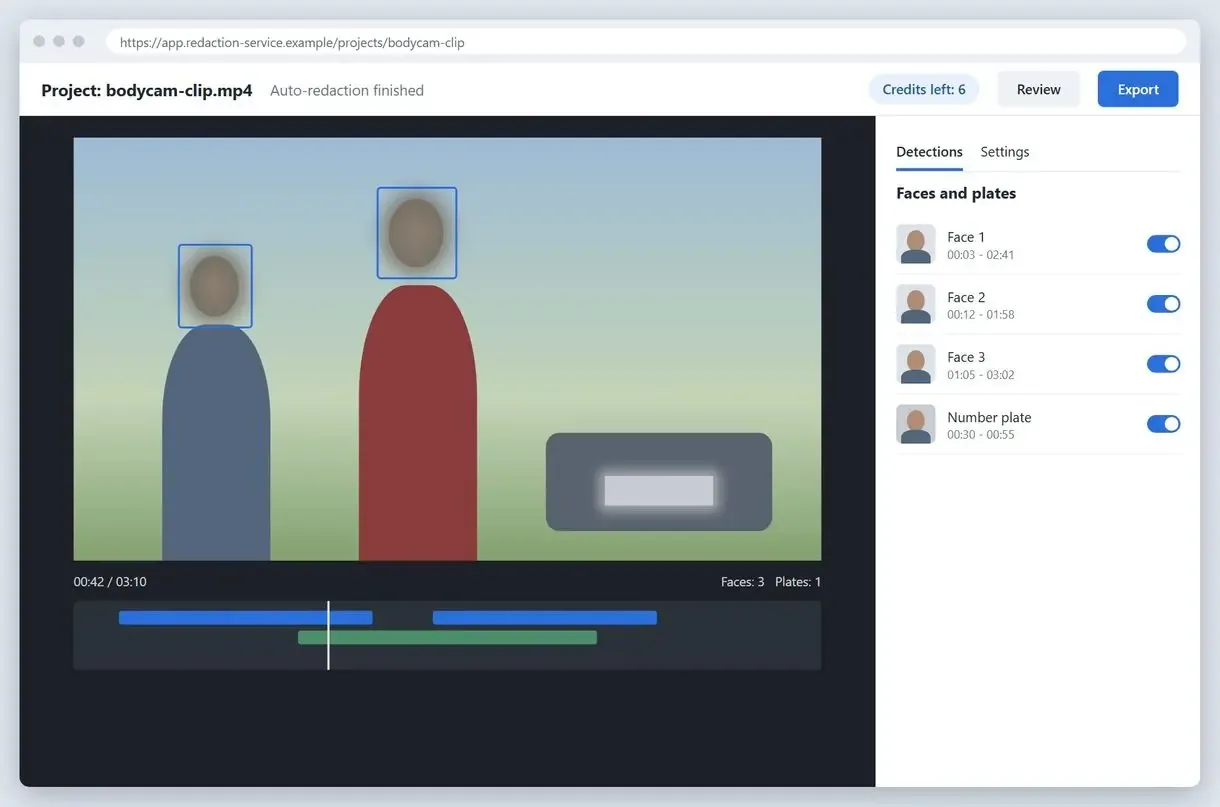
Secure Redact by Pimloc bills in credits, and one credit equals one minute of video. In November 2026, its pricing page listed Basic at $79 a month for 10 credits ($65 billed yearly), Pro at $133 for 20 credits and Advanced at $188 for 30. Extra credits cost $6 to $9. You need Advanced for 4K video.
Pros:
- Runs in a browser with nothing to install
- Starts with 10 trial credits
- Handles documents and images as well as video and audio
Cons:
- Uploads every file to the vendor's cloud
- Uses 60 credits for a one-hour clip, six times the Basic allowance
It fits a handful of short clips a month if you can upload them. A bodycam backlog gets expensive.
6. FastRedaction - best for a single clip with no contract
FastRedaction blurs faces automatically after upload. Its site lists $19 plus $1 per minute: $29 for a 10-minute clip or $79 for an hour. The first video up to 5 minutes is a trial.
Pros:
- Charges per video with no subscription or contract
- Needs no software install
Cons:
- Requires uploading every file
- Gets expensive on long recordings
- Works in the browser only
7. VIDIZMO Redactor - best when IT wants a choice of cloud or on-premise
VIDIZMO sells Redactor as part of a wider platform that also covers audio and documents. It deploys on-premise or as a hybrid, and in public or government cloud. A software catalog lists plans from $99 to $399 a month; an independent guide mentions a 7-day trial.
Pros:
- Offers four deployment options
- Redacts audio from a transcript
- Keeps audit logs for every job across media types
Cons:
- Requires a whole platform when you may need one program
- Publishes "best redaction software" lists ranking itself first
VIDIZMO is a purchase for IT to assess. Compare it with Sighthound if you need on-premise processing.
8. Axon Redaction - best for agencies already inside Axon Evidence
Axon Redaction runs inside Axon Evidence. Redaction Studio handles manual work. The paid Assistant add-on uses AI models built for police work to mask heads, plates and screens.
Pros:
- Sits where Axon body camera footage already lives
- Creates an exemption log on export
Cons:
- Requires Axon Evidence
- Charges separately for the AI Assistant
- Lists no public price
If your bodycams are Axon, start here. Otherwise, it is not an option.
9. Veritone Redact - best for large agencies buying managed services
Veritone Redact automates redaction. An independent guide put its AWS Marketplace listing at about $9.5K a year per 100 hours in early 2026, from roughly $600 a month.
Pros:
- Redacts text, images, audio and video
- Is sold as an AWS Marketplace subscription
Cons:
- Processes footage in Veritone's cloud
- Publishes no list price on its own site; prices appear only through the marketplace
Veritone suits agencies with hundreds of hours a year and an existing cloud contract.
How much does video redaction software cost?
Cloud services charge by the minute, desktop suites charge per user per month, and a local license covers the PC regardless of how much footage you process.
One person priced about 80 GB of footage on a cloud service charging per megabyte, calculated roughly 1,600 euros, and called it "Scary."
For an hour on Secure Redact, you need the Advanced plan plus 30 extra credits. A CaseGuard media seat costs $299 to $379 a month whether you process one hour or forty.
Paying per minute in the cloud
- Every hour adds to the bill
- Each file is uploaded before processing
- Long dashcam trips cost the most
Running a local license
- The price stays the same as footage hours grow
- Footage stays on your own PC
- Long files use GPU time instead of credits
Free video redaction software for real workloads? Only trials. General video editors can handle a hand-drawn mask on one face in a short clip; hours of footage make that impractical.
Can you redact video without uploading it to the cloud?
Yes. Five of the nine can run on a machine you control. Besides our program, that covers Sighthound Redactor and CaseGuard Studio, plus Facit Identity Cloak and VIDIZMO in its on-premise setup.
Dashcam owners who want to blur license plates in video repeatedly ask to keep footage local. One developer built a browser program promising no uploads. Sending clips of other people's cars and faces to a stranger's server introduces the privacy risk those users want to avoid.
Many agency evidence policies restrict where footage may be copied, and that narrows which redaction software for video you can use. A cloud service adds another processor of personal data; local processing depends on your hardware, while cloud services handle the processing time on their servers.
Which video redaction software for law enforcement fits bodycam and FOIA requests?
Records teams need batch processing for large video requests and a log of what was hidden. They also need to handle footage where multiple officers are on the scene.
In FOIA discussions, people call video redaction charges some of the worst fees on the bill because the work is hard. On December 3, 2025, the Illinois Attorney General issued Public Access Opinion 25-014, finding that police cannot charge requesters redaction fees for body-worn and dash camera video.
That ruling makes speed per officer-hour matter. A batch can run overnight or over the weekend, leaving the morning for review. Once you get rid of your backlogs and start releasing, you need:
- An export log with a timestamp per file to show what was released and when
- A file hash to prove the released copy has not changed since export
For a subject access request in the UK or EU, the person is entitled to footage of themselves; you must hide other people in the frame. The ICO's guide to the right of access explains what a requester can ask for. A redaction log is a working record of what you hid, not legal certification. You still need to establish that the release complies with the law.
Among video redaction software for law enforcement, CaseGuard and Sighthound are a fit for records units with a budget per seat. For a small department with one clerk and no IT staff, we would choose a local license on one strong PC.
How do you redact a video file, step by step?
Detect, track, correct, then review every frame you release. Software makes the first pass. A person signs off.
One driver with five hours of road footage concluded that hand-drawn masks could never keep up with every passing face and plate. At that length, automatic video redaction software pays off.
- Export the original clip from the camera system and keep that master untouched
- Run automatic detection for heads, faces and plates, and set the confidence thresholds
- Check the timeline for misses, especially where people turn away or cross each other
- Draw manual areas over screens and badges, plus burned in images and house numbers
- Choose the effect: a solid fill hides everything, a strong blur keeps the scene readable
- Export a new copy, save the log, and watch the result once at normal speed
For a few moving identifiers, tracking one box is faster than a full detection run. Jump from the redaction list to the frame to see it with context and catch a blur covering the wrong head.
High cameras look down on hats and hoods, giving face detectors less to work with. Fixed cameras also burn a timestamp and camera name into the image; the request determines whether you keep or hide them.
A solid black fill leaves nothing to recover by eye. A light blur looks natural, but faces that must remain unrecognizable need a strong setting.
How accurate is automatic redaction, and how long does it take?
Detectors miss almost nothing in easy scenes, but miss a lot in crowds and at top-down angles. One missed frame can identify someone.
We measured version 1.2 of our program on test clips in October 2026. A static camera missed 0% of head frames; two people arguing, 2.7%; shaky handheld video, 4.1%; people crossing, 5.7%; night footage, 12%; and 4K with small faces, 15%. Crowds missed 21% to 37%. In an older build, a top-down camera on people in masks missed 78%. False blur on objects that were not heads came to 21.4% across 16 clips, including water spray and glare.
One plate-blur developer admitted he had not tested foreign plates or night driving; the same list named rain and windscreen glare. A tracker that drops out after a few frames when a face turns is the most common failure across products, ours included.
Watch every exported clip before release. As Fora Soft's redaction guide notes, 99% recall leaves 1%, and one face in one frame is a leak.
Vendor pages advertise "over 99%" detection. Field footage is darker, shakier and more crowded than demos. Treat accuracy figures as best cases and allow time for review.
In a Veritone case study, an Escondido police unit said an hour of video used to take 5 to 10 hours by hand. Automatic analysis still leaves you with review work.
Can video redaction software handle audio too?
Most can mute or beep sections; some can find words for you. Blurring a face leaves spoken addresses, names and badge numbers audible.
With interval redaction, you find sensitive words by listening. Transcript programs such as Sighthound Redactor and VIDIZMO turn speech into searchable text, letting you find a street name and redact every hit. Sighthound's scramble option preserves speech rhythm while removing the words.
For long interviews, transcription saves hours. Interval muting is usually enough for dashcam and CCTV footage with little speech.
Which is the best video redaction software for your team?
The best video redaction software depends on who does the work and where footage may go. A records clerk and a dashcam channel have different needs.
- Records clerk at a small police department: a local license on one PC with a graphics card, reviewing each request. Consider our program or a single Sighthound seat, depending on quotes and budget.
- IT lead at a city or large agency: on-premise processing across several workstations, with audit logs. Consider Sighthound, VIDIZMO's on-premise option or Axon if you already use Axon cameras.
- Business owner releasing CCTV for an access request: an array of CCTV cameras produces long files with few people per frame. Local processing keeps staff and customers out of the cloud. Test a top-down sample first.
- Dashcam or vlog creator: for one or two clips a month, FastRedaction is quick if you accept uploading. Local processing makes sense when you post weekly.
- Records team that redacts documents too: CaseGuard Studio handles video, audio and paper at a per-seat price.
Tools we also considered and left out
- REDACTIVE appears in several 2026 roundups, but pricing is not public and we could not check its official page for this update
- PatrolEyes and Genetec Clearance appear in competitor articles; we did not check their official pages this round and lacked verified facts for cards
- BlurMe blurs in the browser after upload, putting it alongside FastRedaction and Secure Redact
- One browser plate program for dashcam clips watermarks free exports and stops around 15 minutes at 1080p because it builds the whole file in memory
Sources
- SourceForge: VIDIZMO Redactor - Catalog listing of the three VIDIZMO plans
- ONNX Runtime: DirectML execution provider - How AI models run on Windows graphics cards
- GDPR Article 15 - Legal text of the right of access behind DSAR requests
FAQ
What is the best redaction software for video?
For offline work on one Windows PC, the best video redaction software here is AI Video Redaction Software. Agencies with a budget can consider Sighthound Redactor or CaseGuard Studio; for one uploaded clip, FastRedaction.
How to redact video files?
Detect faces and plates, correct misses on the timeline, add manual boxes, and export a new copy. Watch the full result before release.
How do you redact CCTV footage?
Export from the recorder and run detection in your CCTV redaction software. Check where people pass under the camera; high angles need more manual work than bodycam footage.
How do I redact an audio file?
Replace sensitive stretches with a tone or silence. For long recordings, transcription lets you search names and addresses.
What does it mean for footage to be redacted?
Faces and plates are hidden in the released copy, as are screens and voices. The owner keeps the original unedited; a log records what was hidden.
What app can I use to blur faces in videos?
For one face in a short clip, use a video editor with masks and tracking. Many faces or long recordings need automatic detection and tracking.
Do I still need to check the result if the detector claims 99% accuracy?
Yes. On an hour of 30 fps video, 1% is over a thousand frames. One visible face can identify someone.
Can I keep one person visible and blur everyone else?
Yes. Choose the person in the People tab, then confirm the shaded sections the program could not keep visible automatically.
Blur faces and plates on your next release - offline, on your own PC.