Quick answer:
- Small department or newsroom on Windows: AI Video Redaction Software tracks heads and plates and logs each mask
- No new software: mask each face by hand with keyframes in your video editor
- Agency on an evidence platform: cloud and enterprise redaction services add speech transcription and integrations
Most body cam redaction software comes as a cloud service or enterprise platform, often a poor fit for your small records office or newsroom.
In this guide
- On a Windows PC: track and blur heads and plates, keep a redaction log
- Steps: add the clip through to exporting the log
- Alternatives: mask by hand in a video editor, or use a cloud service
What you need
- AI Video Redaction Software on a Windows 10 or 11 PC
- The original clip as it came from the camera
- Headphones to check the sound
- Time to watch the result in full before release
How does body cam redaction software work offline on a Windows PC?
AI Video Redaction Software tracks heads and license plates through the whole clip on your Windows computer. Only the selected heads and license plates blur; you confirm the uncertain stretches.
You can choose anything from a soft blur to a solid fill. This body cam redaction software suits a records clerk or reporter handling a few clips a week.
Masking in a video editor
- Keyframe a mask around each face
- Re-track when someone crosses the frame
- Write the log yourself
Body cam redaction software
- Heads and plates tracked for the whole clip
- You confirm who stays visible
- Log with hashes saved next to the video
How to redact body camera footage step by step
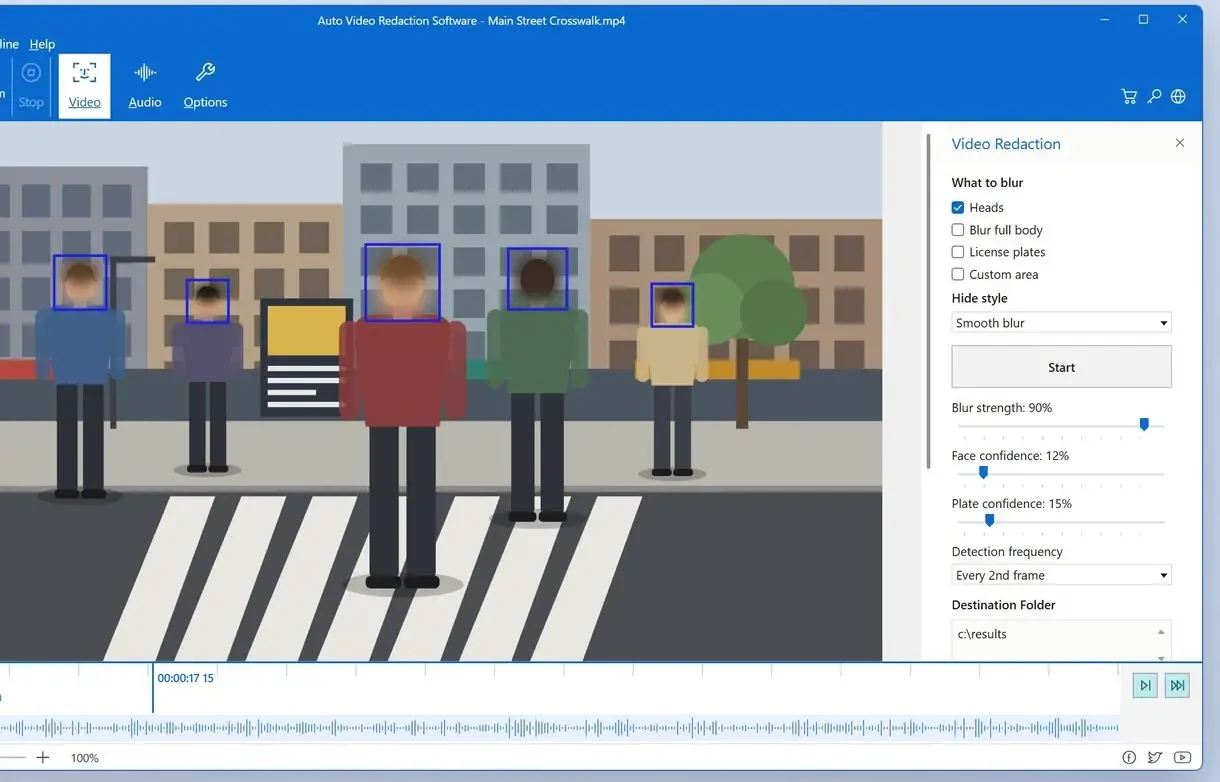
Add the body cam clip to the program
H.264 and H.265 clips open without conversion. When you redact body camera footage, the result is saved as a new file.
Choose what to hide and how it looks
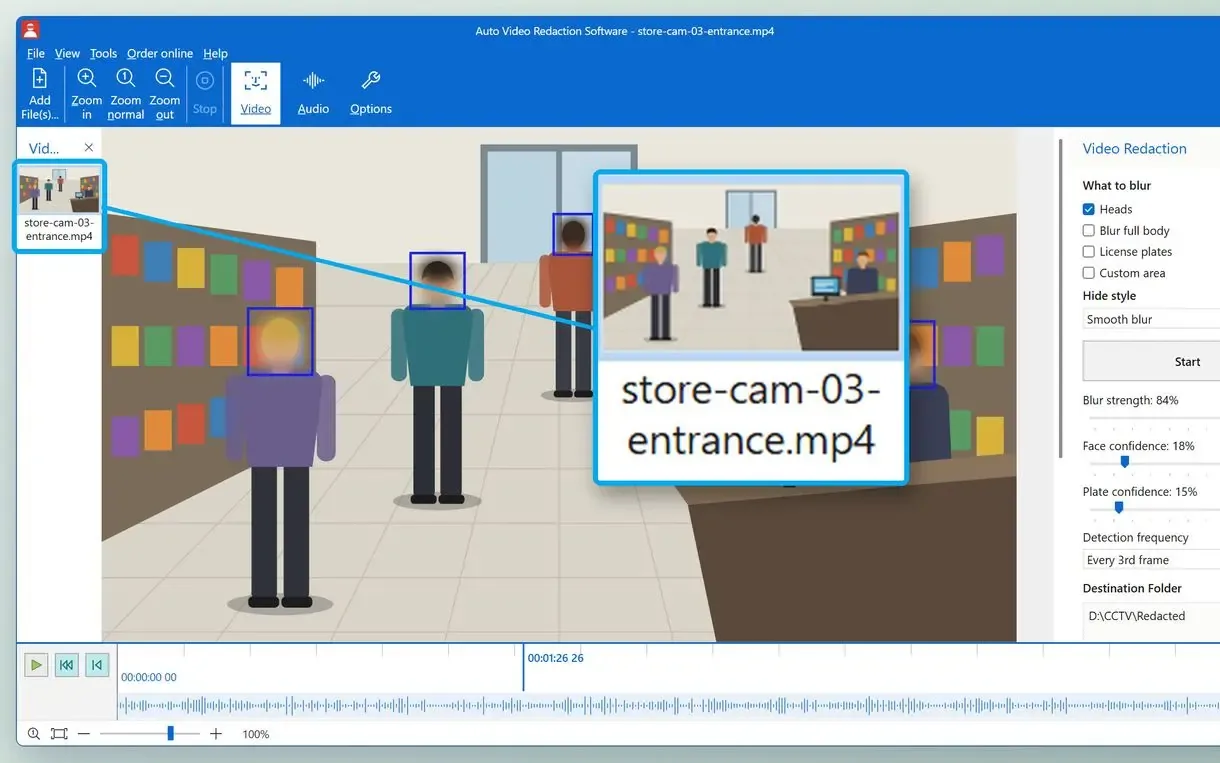
Select a mode, such as Heads together with License plates for a street stop, then a style. Blue frames in the live preview show detections before anything is rendered.
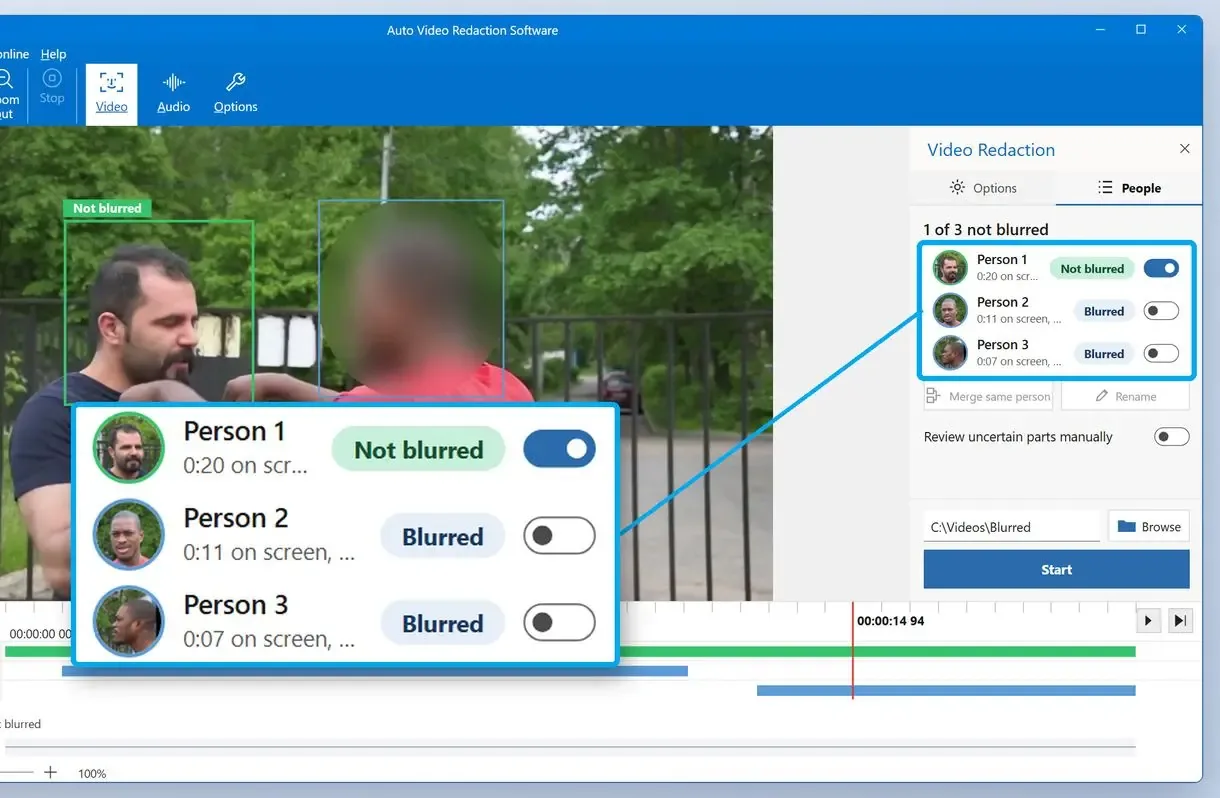
Pick who stays visible on the People tab
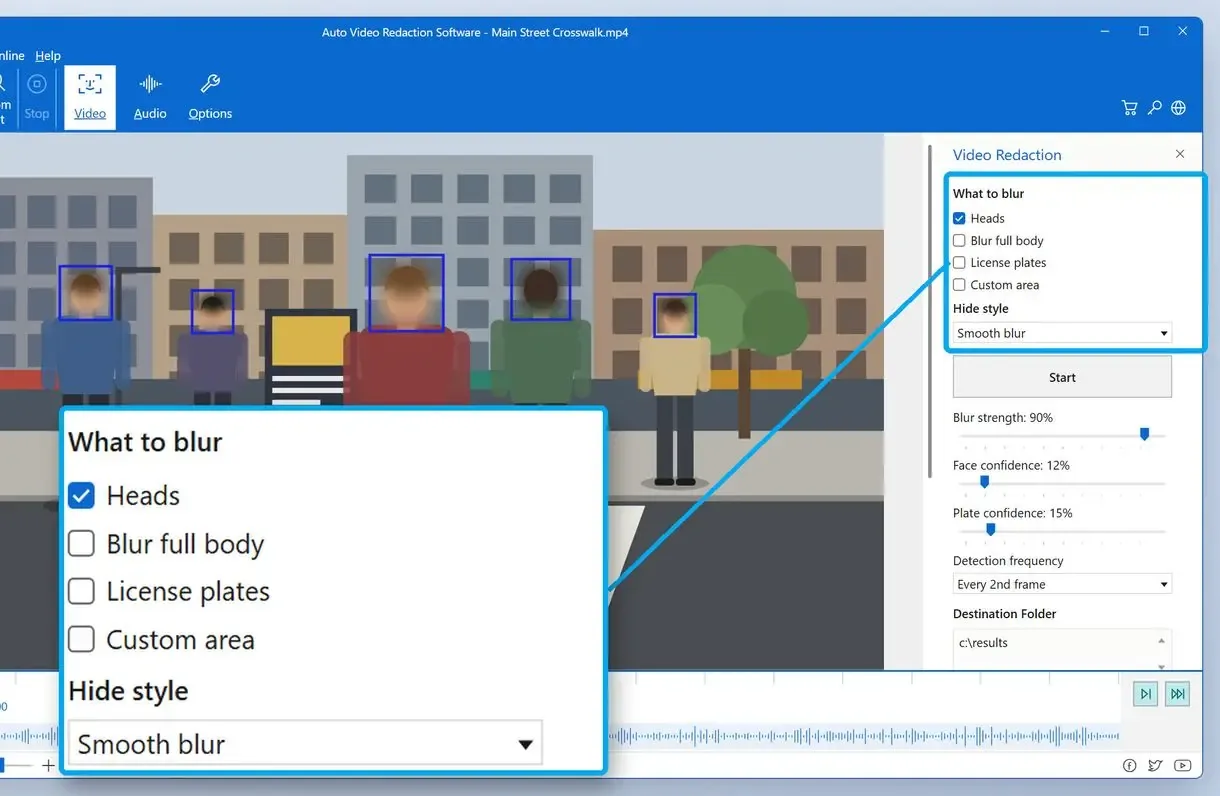
When you redact faces in body cam video, leave the officer visible if your rules allow it. Confirm uncertain stretches and draw a Custom area over anything the detector missed.
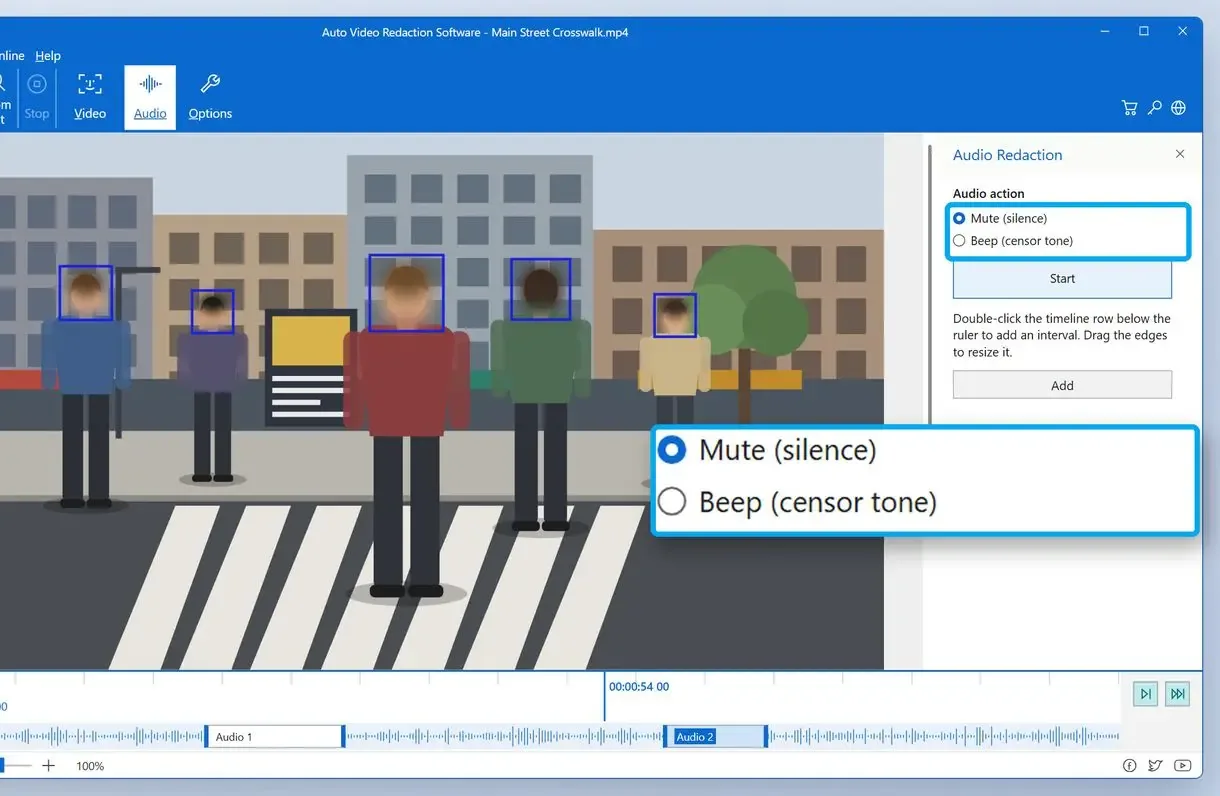
Mark spoken names with Beep or Silence
Listen with headphones and mark an interval over every name and phone number you hear.
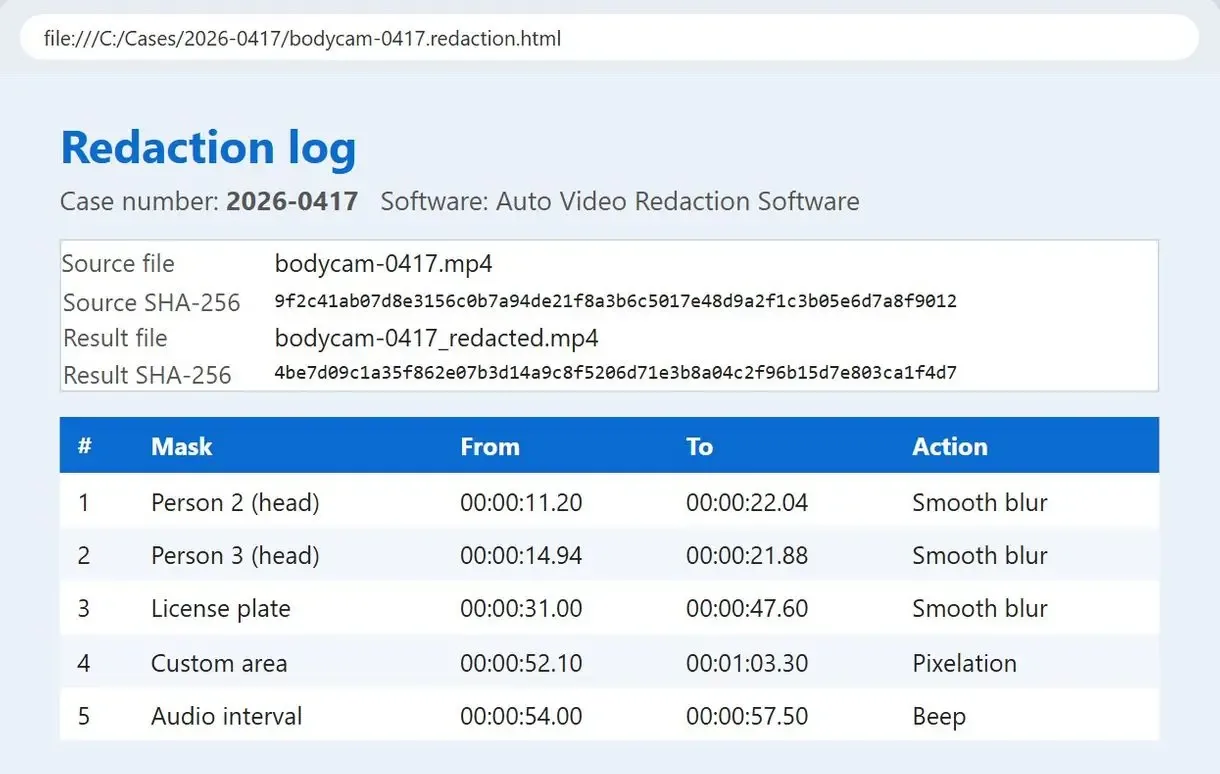
Export the video and keep the redaction log
Start the export. Beside each new MP4, the program saves .redaction.html and .redaction.csv logs listing every mask and SHA-256 hashes of the source and result.
What should be redacted in body cam footage?
Hide details that identify people outside the request's scope. Faces come first: victims, bystanders and minors' faces, especially children's, followed by license plates and documents in view. Check spoken personal details too. Local law determines whether you leave the officer's face visible.
A 2023 advisory opinion from the D.C. Office of Open Government found no basis under D.C. FOIA to blur on-duty officers in a public place. It treated third parties' voices as more sensitive than their faces. Other states set different rules.
A parked car's plate can lead to a home address. Our guide to blur license plates in bodycam video covers moving cars and night shots.
Blur the whole frame or track only some people?
Tempe police in Arizona used a medium blur over entire videos because it was faster than object tracking. The ACLU of Arizona said fully blurred footage undermines public accountability, as ABC15 reported.
How do you redact names and addresses from the audio?
Audio redaction: beep or mute each interval. Mark every spoken name, address and medical detail, then set Beep or Silence over it. Face detection leaves the sound track untouched, so review the audio separately.
Listen at normal speed. Radio traffic and people talking off camera are easy to miss.
A voice reading out a home address still identifies someone whose face is blurred. Finish the audio pass before approving the video.
Why does automatic detection still need a human review?
Detectors miss partly hidden faces and odd angles. Face tracking can jump to another face when two people cross. Have a second person watch the full redacted file before release.
Redaction guides and evidence vendors describe software proposing masks for a person to approve. Give night scenes and crowds the closest look.
Both figures come from one clip on one setup. The second one is the reason to watch passing traffic yourself.
How long does body worn camera redaction take?
A 5-minute clip at 30 frames per second gives you about 9,000 frames to check by hand. On a PC without a graphics card, automatic 720p analysis runs at roughly a third of real time: one hour of video takes around 3 hours to process.
In our test on one clip with an RTX 3060, DirectML analysis ran 2.4 to 4.8 times faster. Fast mode runs at about real time but misses about 1.6 times as many heads. Keep it for a first look.
Manual masking can take two hours for three minutes of footage when people move and cross. That is fine if you need to blur faces in a video once, but too slow for a records backlog.
How do you document bodycam footage redaction for FOIA?
Record what you hid, where and why, ideally with the exemption behind each mask. Keep hashes of the original and released files so anyone can confirm which version went out.
Open the .redaction.html file in a browser or print it to PDF. Import the .redaction.csv into a spreadsheet or case system. Ask your records counsel whether the log meets your state's rules.
Washington, D.C. police withheld body camera videos despite repeated FOIA public records requests, citing an inability to redact them, according to the Reporters Committee for Freedom of the Press.
Can the public get body cam footage, and who pays for redaction?
In most states, anyone can file a public records request with the agency holding the footage. The agency redacts what state law exempts. Who pays depends on the state.
In 2020 the California Supreme Court ruled that agencies cannot pass digital redaction costs to requesters, as the EFF explains. The Iowa Public Information Board found a $694 fee for outside redaction of one request reasonable, noting that video takes more skill to redact than a PDF.
What are the other ways to handle police video redaction?
For police video redaction by hand, use keyframes in your current video editor to mask faces and mute parts of the audio track. Large agencies often use cloud or enterprise services linked to their evidence systems.
| Method | Where the footage goes | Faces and plates | Audio | Redaction record |
|---|---|---|---|---|
| AI Video Redaction Software | Your Windows PC only | Tracked automatically, you confirm uncertain parts | Beeped or muted intervals you mark | HTML and CSV log with SHA-256 hashes |
| Video editor by hand | Your PC | A mask and keyframes per face | Mute or cut on the timeline | Written by you |
| Cloud or enterprise service | Uploaded to a vendor platform or run on agency servers | Automatic detection with review | Some add transcription and word search | Kept in the platform |
- Small records backlog, no evidence platform: a desktop program
- One short clip, an editor you know: masking by hand
- Thousands of hours, an existing evidence platform: an enterprise service
For a school or shop clip without a records request, a general video censor tool is often enough.
Sources
- D.C. Office of Open Government: advisory opinion on body-worn camera redactions (2023) - which faces and voices may be redacted under D.C. FOIA
FAQ
How do you legally request body cam footage?
File with the police department or sheriff's office that recorded it. Give the date and place, plus the incident number if known.
Can you edit or blur CCTV footage?
Yes. Use the same methods for a recorded CCTV clip. For a still frame, you can blur a face in a photo. Top-down angles and crowds need more manual review.
Is there free software to redact body cam video?
Your installed video editor costs nothing extra but takes hours per clip. AI Video Redaction Software has a free trial with every feature; at the time of writing, it saves the first 3 minutes of each result (half of a shorter clip), without a watermark.
Why does the blur jump to another person when you redact faces in body cam video?
At crossings, confirm the program's flagged stretches and watch every crossing in the final file.
Does the metadata of a redacted video matter?
Yes. GPS coordinates and device details in the file can reveal what the blur hides. Check the exported file's properties before release and strip anything your records rules exempt.
Does bodycam video redaction mean blurring the whole clip?
Bodycam video redaction that tracks only the people who need protection keeps events visible and is easier to explain in the log.
Blur faces and plates on your next release - offline, on your own PC.