Quick answer:
- One request, footage must stay on your PC: AI Video Redaction Software blurs heads and plates and logs each pass
- A short clip and an afternoon to spare: blur each person by hand in a video editor with a mask effect
- Many requests or no one free to handle them: a redaction service does the work, but the footage leaves your hands
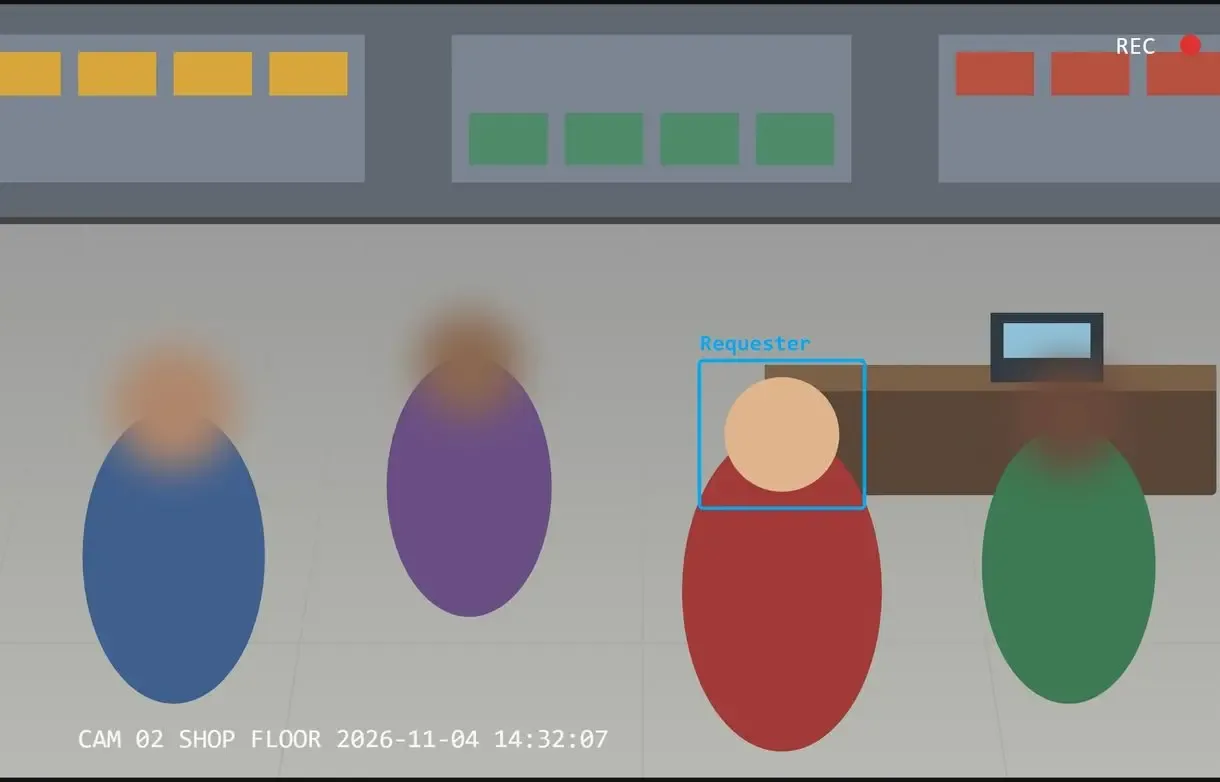
For a shop, office or clinic owner holding a subject access request, how to redact CCTV footage is a practical question with a deadline. After an incident, everyone is immediately looking for answers, and the person on camera has a right to a copy. The other customers in the same frames keep their right to privacy. Owners of small shops who got these requests say blurring other customers frame by frame can be done, but it takes time they do not have. Below is what to hide, the ways to hide it and how to show later what you did.
In this guide
- Handle one request in-house on your own PC
- Walkthrough: from the request to a checked copy and log
- Blur a short clip by hand when you have time
- For many requests or no one to handle them: software, editor or service
What you need
- A Windows 10 or 11 PC with disk space for two copies of the clip
- The clip exported from your recorder, with the original kept in a separate folder
- AI Video Redaction Software for the automatic pass and redaction log
- Time to watch the result from start to finish
CCTV redaction software on your own PC: AI Video Redaction Software
AI Video Redaction Software runs on Windows. It finds heads, whole figures and number plates, blurs them and saves a log of what it hid next to the video. Watch the result and cover anything it missed with a Custom area.
Nothing is uploaded. The program opens common recorder exports such as MP4, AVI, MKV and MOV, and reads HEVC, VP9 and AV1 video without conversion. During analysis, blue boxes mark detected objects in the live preview.
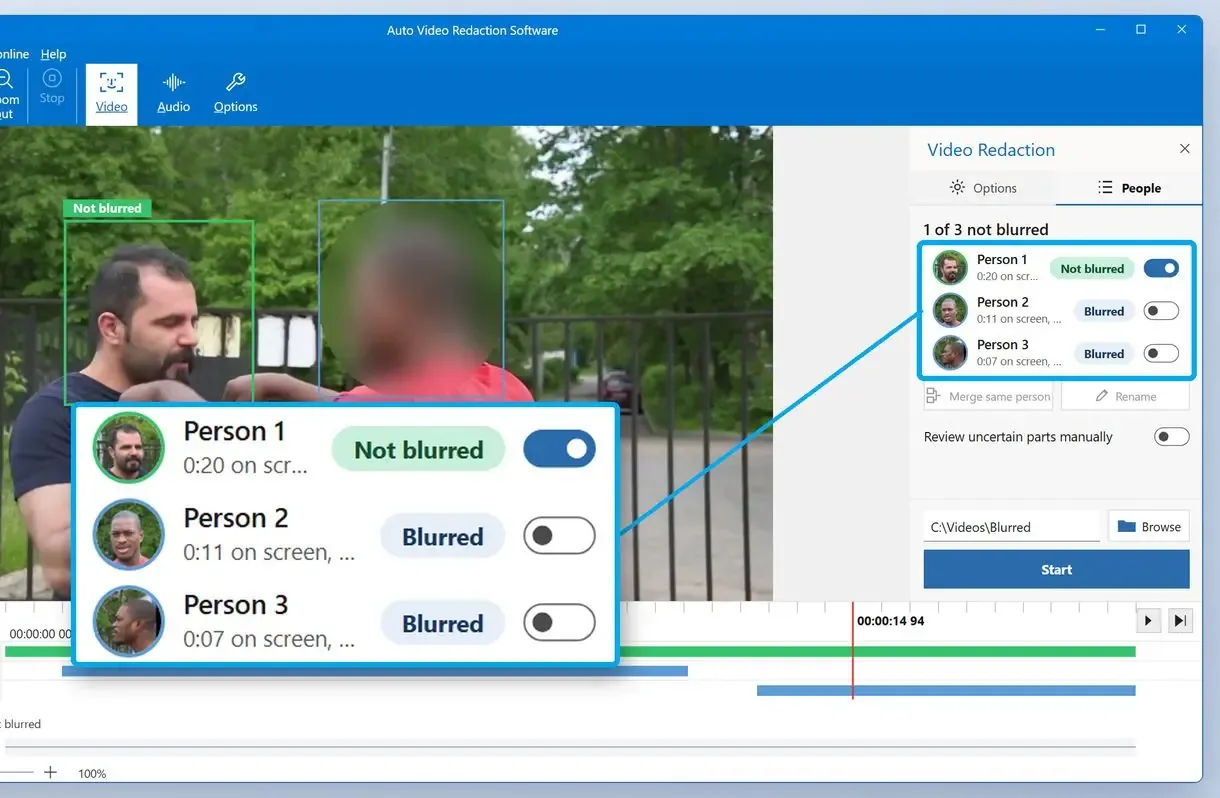
In the People tab, select the person who asked for the footage and leave them visible while everyone else stays blurred.
Cameras mounted high above a room, faces under hoods or masks, and dense crowds make detection less reliable. Review those sections closely.
Blurring by hand in an editor
- Draw a mask on each person and move it as they walk
- Repeat for every face, plate and camera angle
- Keep your own notes of what was hidden
With the app
- Detectors find heads and plates across the whole clip
- You keep the requester visible and fix the misses
- A log with hashes is saved next to the video
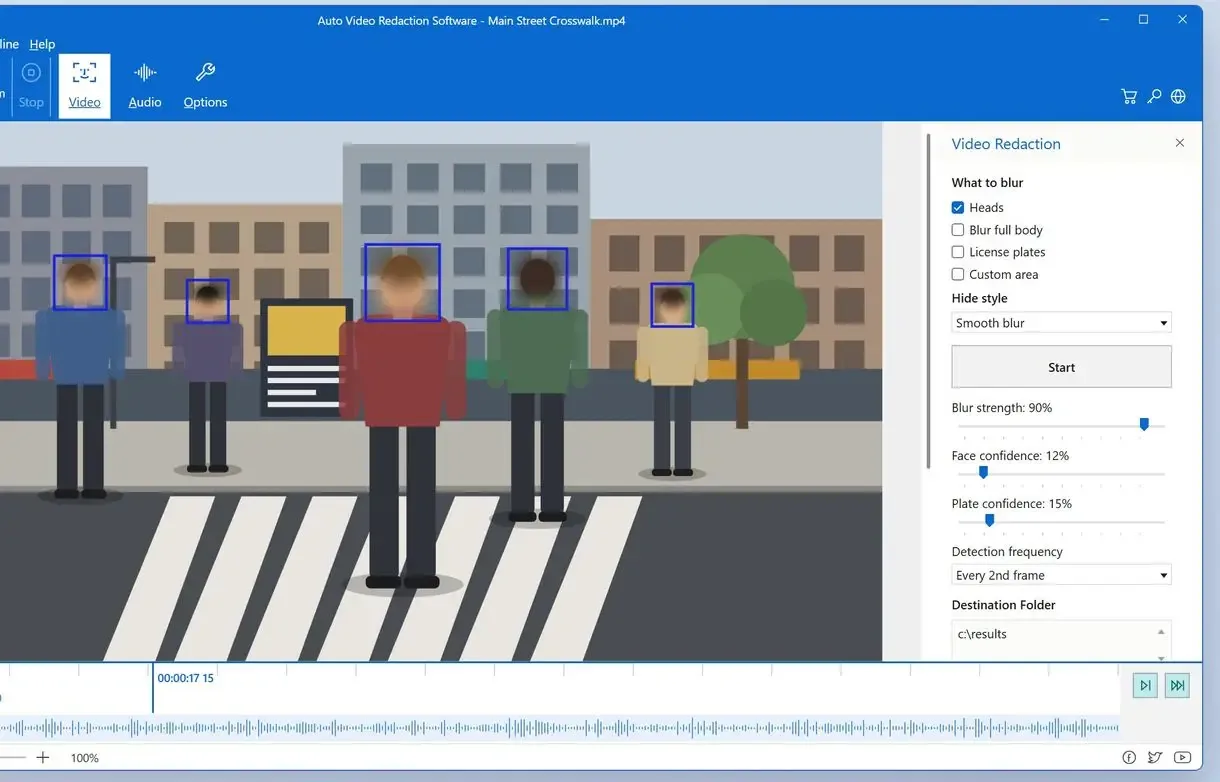
Step by step: redact a CCTV clip for a subject access request
Open a copy of the clip, never the original
Export the requested time range from your recorder and move the original to a folder you leave alone. If the incident has multiple angles from different cameras, redact each file on its own.
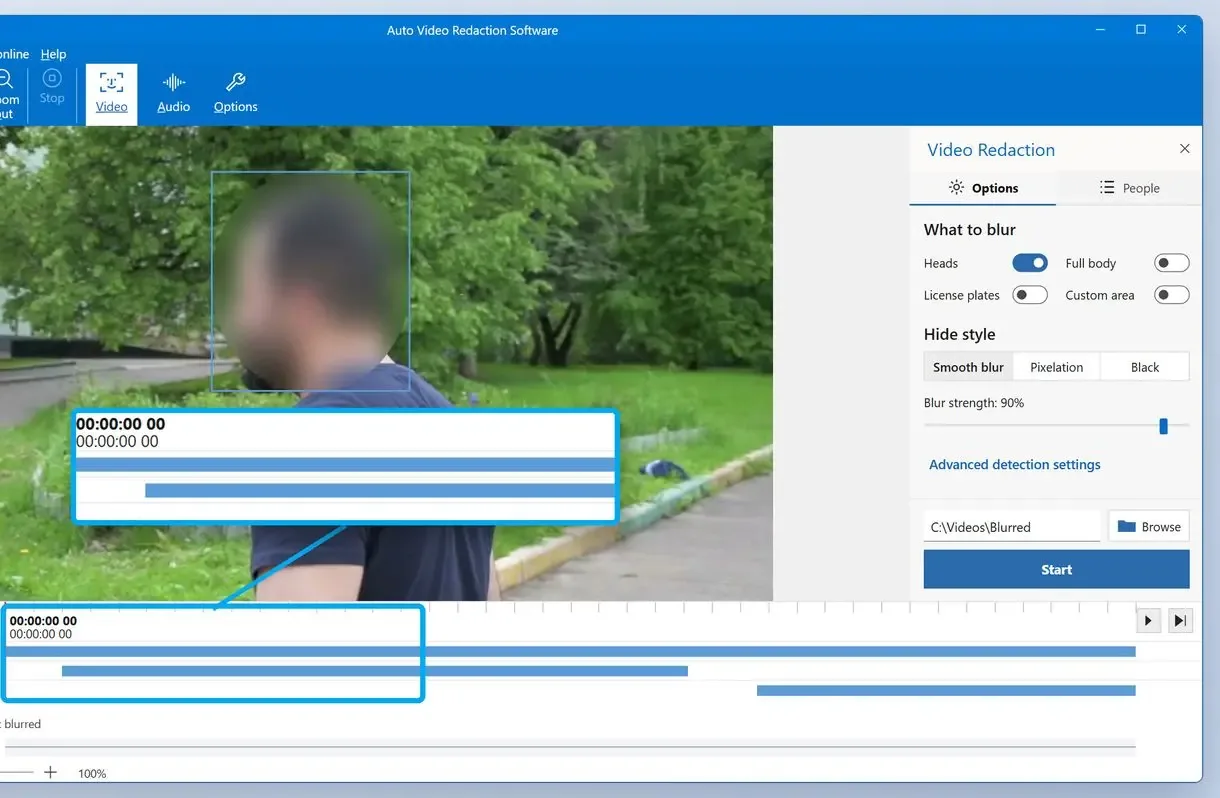
Choose heads, full body or plates
Pick heads for grainy footage. Use Full body when clothes and tattoos are sharp enough to recognise someone. Turn on plates if cars are in view.
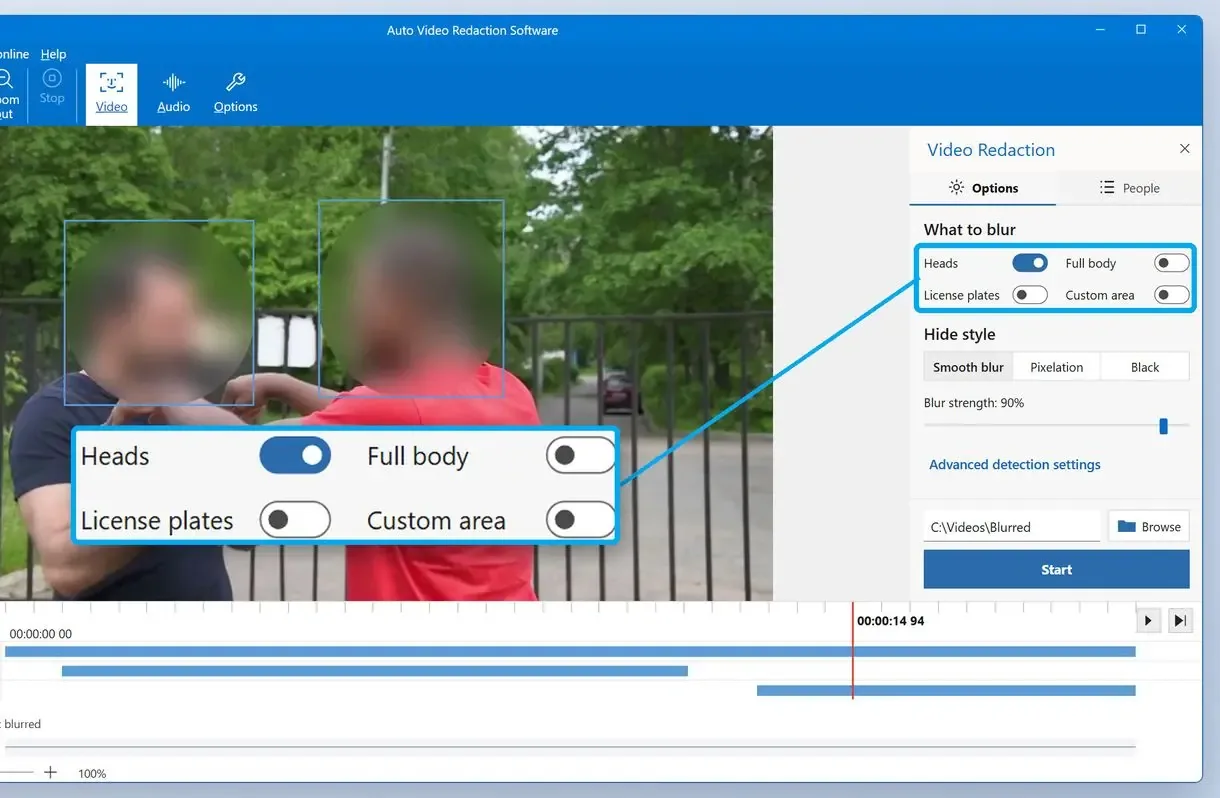
Keep the requester visible on the People tab
Open People, select the person who made the request and confirm the segments marked as uncertain. Person selection works with head blurring, so use heads for this pass.
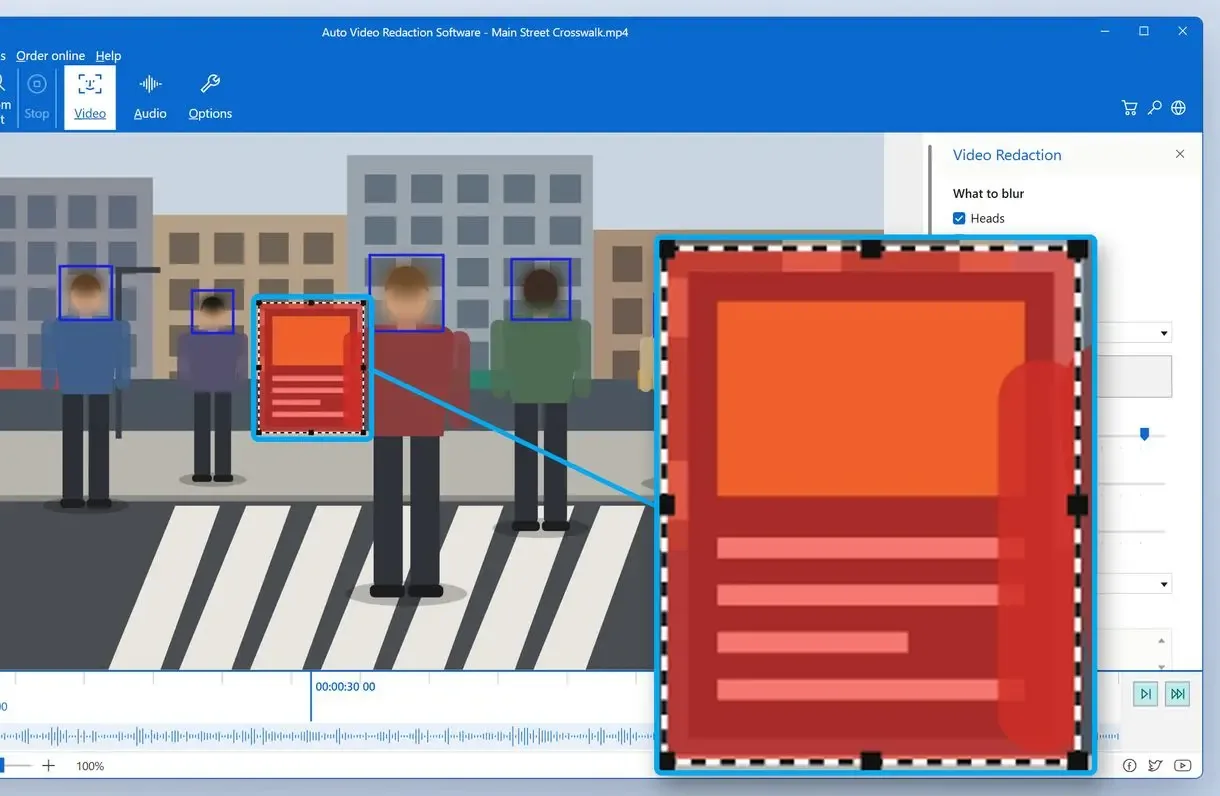
Cover what the detector missed with Custom area
Play back each covered range and check it closely. Draw a Custom area over any face or plate the detector skipped near doorways, mirrors or the frame edge.
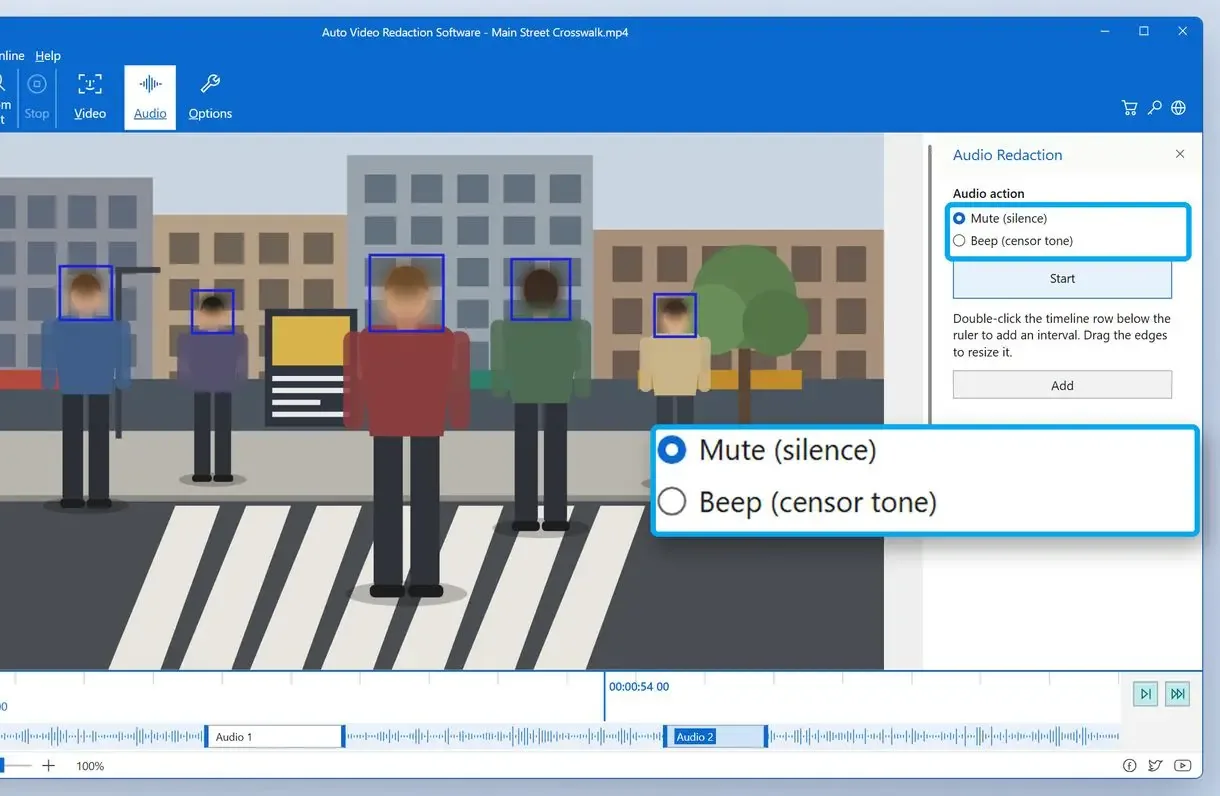
Mark the voices with Beep or Silence
Listen to the soundtrack and mark every interval where someone other than the requester speaks. Choose Beep or Silence for each one.
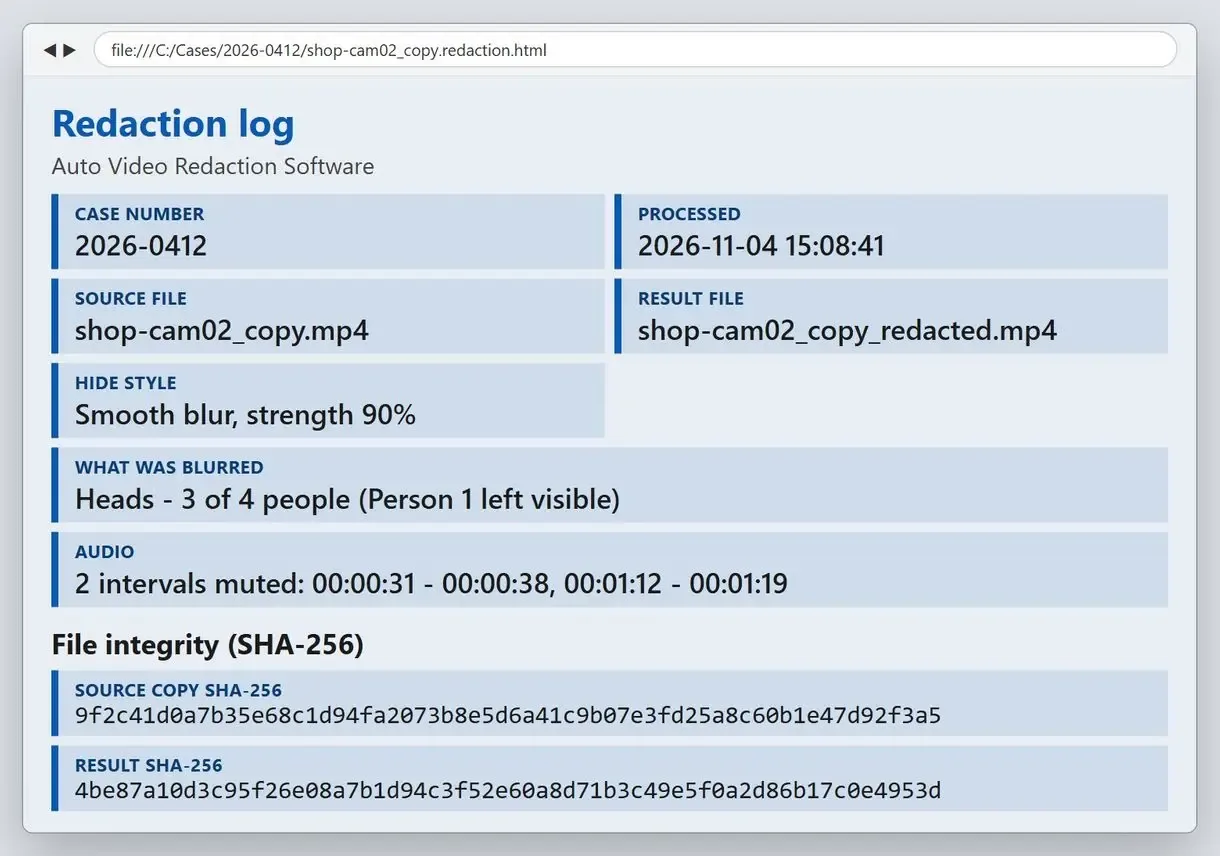
Export and keep the redaction log with the case
Type the case number if you use one, then click Start. File the .redaction.html and .redaction.csv with your reply to the request.
How to redact CCTV footage by hand in a video editor
Any video editor with a blur or mosaic effect and keyframes can redact video footage this way. Draw a mask over each person and move it as they move. This suits a clip of a minute or two with one or two people; unless you write a record, it leaves no record of what you hid.
Masking in an editor is tedious manual redaction. A customer walking past the till changes position in every frame, so the mask needs a new keyframe every few frames. Each extra person adds the same work. Busy footage and repeated requests make the job very time-consuming.
For a single short clip with one passer-by, it works. The steps are the same as when you blur faces in a video from a phone or camera.
How to keep the mask on a moving person:
- Make the mask clearly larger than the face, so a turn of the head stays covered
- Check the first and last frames of each appearance, where masks slip most often
- Use a heavy blur or a solid block instead of light softening
- Save the project file and a short note of what you covered and where
Software, manual editing or a service: which fits one request?
For one request with several people in view, desktop CCTV redaction software reduces frame-by-frame work to a review. Handle a short clip with one passer-by by hand. A paid redaction service suits a steady flow of requests when nobody is available to do them.
As Ashfords' guide to CCTV subject access requests notes, some organisations redact footage themselves and others hire a provider. A firm that offers redaction says reviewing footage by hand takes a colossal amount of time. Small teams are already busy enough.
- One short clip, one or two people, no audio: blur by hand in an editor
- Several people, plates or voices, and the footage must stay on site: desktop CCTV redaction software
- Dozens of requests a month and nobody to run them: a redaction service
- An online blur site: only for footage you could publish anyway
| Method | Where the footage goes | Record of what was hidden | Your time |
|---|---|---|---|
| AI Video Redaction Software | Your PC only | .redaction.html and .csv with SHA-256 hashes | Analysis plus a full review |
| Video editor by hand | Your PC only | Your own notes | Every frame with a person in it |
| Redaction service | Sent to the provider | Whatever the provider supplies | Briefing them and checking their copy |
| Online blur site | Uploaded to a third-party server | Depends on the site | Upload, review, download |
Some risks are worth taking. Uploading strangers' faces to a website you know little about means the file sits on someone else's server. For other jobs, such as hiding text or objects in ordinary video, see the video censor tool.
What do you have to hide in CCTV footage before you send it?
The requester is entitled to a copy of information about them, not the full recording. Blur or mask anyone else who can be identified. A face, tattoo or car registration can identify someone.
The ICO guidance on video surveillance says to provide what concerns the requester. It names blurring, masking and solid fill as techniques, and applies to the soundtrack as well as the picture.
Before export, check for:
- Faces of other customers, staff and passers-by
- Clothing, tattoos and logos when the picture is sharp enough to recognise someone
- Vehicle registrations in car parks and at the kerb
- Children, who need the most care
Blunders are costly here. One face left visible in a clip sent to the wrong person discloses somebody else's personal data, and you cannot call the file back.
Should you blur only faces, or the whole person?
On grainy, low-resolution footage, blurring faces is usually enough. On sharp footage, a jacket or tattoo can identify someone, so blur the whole figure. Hide other people's car registrations too.
One analytics firm's rule of thumb: hide faces in grainy footage and blur the whole person in sharp footage. A 4K camera over the entrance falls in the second group. An old camera covering the parking lot at night often falls in the first. When unsure, choose the larger cover: a blurred jacket costs the requester nothing.
A registration links a vehicle to its keeper. When we ran a street clip through the app, its plate detector covered a European plate in every frame. Small plates on cars far from the lens still need checking by eye. The same approach applies when you blur license plates in dashcam and bodycam video.
How do you redact the audio on a CCTV recording?
If the recording has sound, voices and names spoken aloud identify people just as faces do. Listen to the whole track, mark each interval where another person can be heard and replace it with a tone or mute it.
Many shop and office systems record sound without the owner remembering it was switched on. Picture-only redaction can leave a colleague's name or a customer's phone number audible. In the app, mark the audio intervals on the timeline and choose Beep or Silence for each one. You make each decision by ear.
A beep tells the requester something was removed. Silence sounds smoother but can look like a fault in the recording. List the intervals in your reply so the gaps are explained.
How do you check that automatic CCTV redaction missed nothing?
Watch the whole exported copy at normal speed, then step slowly through entrances, dark corners and crowded moments near the frame edges. Detection drops in low light and with motion blur. Turned faces, plates at a sharp angle and people far in the background are easier to miss.
A Fora Soft overview of video redaction software lists the same causes of missed detections. People who build these detectors say a human review step is not optional. A face in a dimly lit doorway can be found in most frames and lost in a few, and those few frames are the ones that leak.
Vendor pages promise full regulatory cover in minutes. The regulator leaves the choice of method to you, case by case. Treat the detector's output as a first draft that you sign off.
Which kind of blur is safe when you redact video footage?
Use a heavy blur, a pixel block coarse enough to erase features, or a solid fill. Light softening can leave enough detail for face recognition to match.
Researchers keep showing that face recognition can re-identify blurred faces, and gets better at it each year. The New Zealand Privacy Commissioner's guidance on CCTV requests makes the point directly. The aim is that nobody can recover hidden details later, whatever software they use.
The ICO also suggests removing metadata from footage files where necessary. Device names and locations can reveal more than the picture.
Do not delete the original or let the recorder overwrite it while the request is open. Copy the clip out of the recorder's loop first; the ICO calls preventing premature deletion of requested information good practice.
How can you show later what was hidden and when?
Keep a record linking the original to the copy you sent. The program saves a .redaction.html report and a .redaction.csv table next to the video with every export. They contain SHA-256 hashes of the source and result, what was blurred and when, and an optional case number.
The log records the work, not the thinking behind it. Put the reasons given for redaction in your cover note to the requester.
One well-known video editor states on its own page that it keeps no chain-of-custody log and does not touch the audio. With a tool like that, record the work in a spreadsheet, one row per file with the time ranges covered and the date.
How long do you have to answer a CCTV footage request?
In the UK, you must answer within one month of receiving the request. The ICO allows up to two more months for a complex request. Start CCTV footage redaction early: an hour of 720p video takes about three hours to analyse on a PC without a graphics card.
Sprintlaw's explainer on CCTV and UK GDPR gives the same usual one-month window. When the request covers hours of CCTV footage, analysis time adds up. Fast mode in the app runs close to real time. Long recordings can run overnight or over the weekend while the PC is idle. Reviewing the result still takes your time.
Can you refuse a request because you have no tool for CCTV footage redaction?
No. Not owning redaction software is no reason to refuse. The ICO suggests redacting other people rather than withholding the footage. If you cannot do it in-house, use a manual editor or a service.
New Zealand's privacy regulator told organisations that lacking tools to crop or redact is not a good reason to refuse access.
Talk with the requester before you decide how to redact CCTV footage from a long recording. A narrower window, such as the minutes around the incident, reduces the work for both sides and gets the copy out sooner.
Sources
- Medical Protection: the use and disclosure of CCTV footage - notes that third-party redaction may extend to car registration plates
FAQ
How do I redact an audio file?
Mark each interval where another person speaks or a name is said, then bleep or mute it. For CCTV, do it on the same copy you blur, so picture and sound stay in sync.
Is it possible to redact a video?
Yes. Blur, pixelate or cover parts that identify other people, by hand or with software that detects and tracks faces and plates. Export a new file and keep the original.
Is it possible to edit CCTV footage?
Edit a copy for disclosure, but leave the original recording unchanged. The redacted copy protects third parties; the untouched original shows what the camera recorded.
On what grounds can you refuse a subject access request?
The grounds are narrow. Lacking a redaction tool is not one of them. Where other people appear, the ICO suggests redacting them rather than withholding the clip.
Is CCTV subject to GDPR?
Yes, when footage shows identifiable people. In the UK, their images are personal data under UK GDPR, so they can ask for a copy.
What are the GDPR rules for CCTV footage?
For access requests, give the requester a copy of footage about them within one month, hide other identifiable people and keep the original until the request is closed.
Can I blur someone's face on my iPhone?
Yes, many phone video editors have a blur or mosaic effect for short clips. For long CCTV recorder exports, a computer is usually more practical.
Is it legal to redact body cam footage?
Yes. Redact a copy before disclosure to protect people who are not the subject of the request. Keep the unredacted original under your normal retention rules and log what you hid.
Is a transcript or a still picture enough?
The ICO says a transcript of the audio or picture does not meet the request in most cases. A single still cannot show the whole incident either. To blur a face in a still photo you sent separately, a photo editor is enough.
Does the free trial export the whole video?
The 10-day trial exports the first 3 minutes of clips that run 4 minutes or longer and half of shorter clips, with no watermark. The redaction log notes that only the beginning was exported.
Blur faces and plates on your next release - offline, on your own PC.